Tired of promotional emails cluttering up your inbox? This super easy, 2-minute hack will keep all unwanted spam emails out of your inbox for good. I used to get 97.6 marketing emails per day. Thanks to this trick, I have been SPAM-free for 323 days and counting, so far spared from the distraction of 21,189 bulk emails. Works for outlook, gmail and more!

If you’ve ever gotten so fed up with the constant onslaught of promotional SPAM emails cluttering your inbox that you’ve briefly considered moving to Canada for the sole purpose of seeking refuge under the CAN-SPAM Act, this might be your lucky day.
My inbox has been SPAM-free since Tuesday, October 27, 2015 at 5:27 PM, ever since figuring out this little hack which I am going to show you in this post today.
Poor Kevan from Buffer was the first to just barely miss the cut at 5:28 PM and end up sentenced away to a dark, dungeon-of-an-outlook folder, far from my primary inbox for which it was intended. I sometimes try to imagine what my life might be like today had that “Complete Guide to Social Media Success” arrived just one minute in the other direction. Ah, Kevan from Buffer, two ships passing in the night, you and I…
In the 323 days (217 business days) which have passed since deciding to quit receiving SPAM for good, thanks to my little hack, 21,189 promotional emails have managed to evade my work inbox alone. That’s an average of 65.6 emails/day, or 97.6 emails/day if you only count business days.
I was getting inundated. And I’m not the only one being victimized by a constant bombardment of promotional marketing emails:
(Source: Spam Laws)
(Source: Hubspot)
What is SPAM Email?

By definition, in order to officially qualify as “SPAM” an email must be:
1) Unsolicited – the recipient has not granted verifiable permission to the send
2) Bulk – message is sent as part of a larger collection of messages (usually to multiple recipients), all having substantively identical content.
I know for a fact that I had not subscribed to receive emails from most of the organizations that were sending them to me, and as a digital marketer, I know a mass, automated email when I see one.
Not All Email Marketing is SPAM
Despite how it might sound, I am not anti-email marketing. Quite the opposite actually. When used correctly, email marketing is a valuable tool for educating and communicating with customers that should be in every business’s toolbox.
Unfortunately, a lot of people commonly confuse good email marketing and SPAM as being one in the same.
As a digital marketer, I have a personal vendetta against companies who send SPAM emails, because they give the rest of us a bad name.
It’s not fair to all the good marketers out there who actually put in the time and effort to organically build a legitimate opt-in email list, and consistently deliver subscribers helpful, relevant content through quality email marketing, to be unfairly cast in the same light as others who break the rules and try to cut corners by spamming people.
And why should the good guys who have actually earned the right to be there have to compete with the spammers for customers’ attention inside their inbox?
Just like how those who engage in poor, misleading online advertising practices can ruin it for all advertisers by driving customers to get ad-blockers, the hack I’m showing you today is another example in which all email marketers are subjected to the consequences caused by the actions of just the bad eggs.
Why I decided to Live “SPAM-Free” and Share this Hack So Others Can Too

It was seriously starting to impact my productivity.
I have a very busy job, and work in a fast-paced environment where it is not uncommon for me to be communicating with as many as tens of people simultaneously at times via more channels than I can sometimes count. Last time I worked from home I listed them out in the email I sent around to the team…”WFH, available via all channels (skype, slack, JIRA, cell, GoToMeeting, whatsapp, work email, personal email.” And that’s not including Twitter, Facebook, LinkedIn and many other platforms regularly monitor and update, as a part of my job.
I actually rarely work from home, as I prefer to be in the office with my team. However, our work environment is very open concept, and our team very collaborative by nature, which means frequent stop and chats to add to my list of potential interruptions.
Did you know that it takes an average of 23 minutes and 15 seconds get back to the point that you left off after a distraction?
Let’s have some fun and pretend for a minute that I hadn’t created the hack and was still been receiving SPAM emails for the past ten months. Say I had gotten distracted by just 5% of those 21,189 promotional emails.
Wanna guess how much potential time that could have lost me?
441.18 hours. That’s over 18.3 full days of potential lost time, and 55.14 business days! If only 2% of the emails distracted me, it would still be 22.1 business days lost!
The email distractions just had to go.
Everyone should have the freedom to choose how they wish to interact with brands online.
As I discussed in a previous article on why the customer journey is the future of digital marketing, with the “Age of the Customer” upon us, we are shifting more and more towards an increasingly customer-centric modern world (and web) that caters to the specific interests, desires and preferences of individual; a place where every internet user is empowered to get the experience they want, and to engage (or not engage) with whomever, whenever, however and whenever they wish.
And while this certainly makes life difficult for us digital marketers, in my opinion, it’s only right. Each individual customer should be free to set their own definition for what constitutes a positive customer experience for them, and for brands to respect their terms, unconditionally.
If a customer doesn’t want to be advertised to, they are free to use an ad-blocker. If they don’t prefer to receive marketing emails, they should have that option.
Here’s My Quick & Easy Hack to Keep All Unwanted Spam Emails Out of Your Inbox for Good
What we’re doing here, and how it works (big picture)
In many countries, the law requires that all promotional emails contain a functional unsubscribe option that is easy for the user to find. Therefore, almost all promotional marketing emails that are sent in bulk today contain a link to unsubscribe from the mailing list, even if you never subscribed in the first place. They also all tend to use much of the same terminology and language in their unsubscribe messages and links, which is the loophole that we’re exploiting with this hack…
Read this Before You Continue
I will make an effort here to be upfront about any disclaimers I can think of. I also want to point out that this little hack s in absolutely in no way dangerous, or sketchy in any way whatsoever. And I keep calling it things “little” and “simple” because it really isn’t rocket science – an average toddler or extremely smart monkey would conceivably be able to do this (though no guarantees on the two-minute time-cap for them…)
Please be sure to scan this list of requirements and disclaimers below:
- This hack only works for automated emails that contain at least one unsubscribe link
- It doesn’t work for real emails manually sent by humans. Yes, that means emails personally sent by sales reps still get through.
- It is illegal for businesses to send automated emails without unsubscribe links, so if for some reason that happens, it will in fact come through to your inbox, at the risk of breaking the law. How you decide to handle this is between you and the sender offender.
- This hack blocks all bulk marketing and promotional emails from entering your primary inbox, whether they truly qualify as being SPAM or not
- Your email service provider must have the capability to create custom folders and routing rules for email
- Over time you may need to add additional phrases to the list if you notice some companies emails begin slipping through to your inbox by juking past the logic with the use of some elusive, out-of-the-ordinary language in the unsubscribe line. Every once in a while I do the same when this happens to me, and will hence forth update the running list I’ll share with you today on this post with the latest rules that I add.
- You will technically still receive all of the emails, just in a separate folder than your primary inbox
- For those whose SPAM emails are not in English, the trick should still work, however unfortunately you will need to create your own list to use in your rules. Here is a link I found for you, my global friends, which has the translation for “Unsubscribe” in Chinese, French, Dutch, Turkish, Italian, German, Japanese, Hebrew and Swedish to get you started, which if you are looking to block as many different languages as possible, may be of some use.
- The bad news for global folks is that some companies estimate that as many as 73% global emails are SPAM, VS only 45% in the US, so it may be more difficult to make this hack as airtight. However, I’ve never tested this myself so I’d be interested to hear the outcome!
If none of the above sounds too disagreeable to you, please proceed to the step-by-step directions below. If you do have an issue with anything, if it’s something I can help with I will be happy to, however, I would like to remind you that I am not an IT professional, and don’t get paid for rigging people’s email systems, so if I am unable to answer your question or point you in the right direction of a solution please do not take it out on me.
I’m not going to walk through the step-by-step instructions for every email service provider, but the way to do it will be conceptually the same for all, you’ll just need to find the instructions on how to setup custom email rules for whatever platform you are using if you aren’t already familiar with how to do this.
Instructions for Microsoft Outlook
(For more detailed step-by-step directions on how to create a rule in Microsoft Outlook, check out this support article.)
- Create a new folder in outlook for where you will redirect your spam emails
- Create a new email rule by selecting File / Manage Rules and Alerts / New Rule
- Select “Move messages with specific words in the subject to a folder” and click next
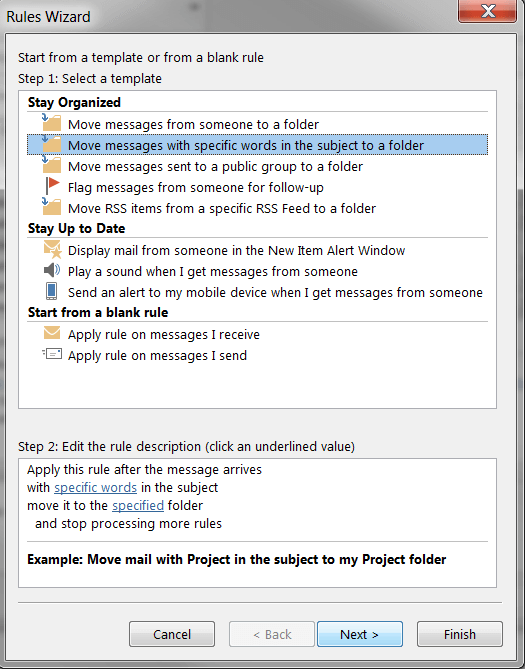
- Deselect the box for the condition “with specified words in the subject“, and select the box for the condition “with specified words in the body“
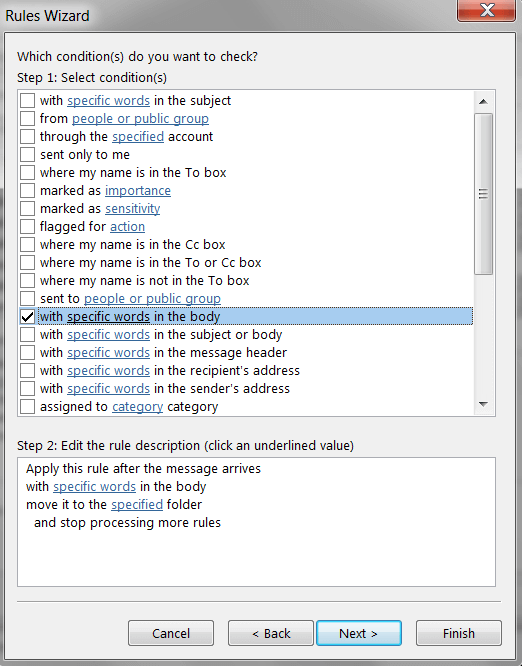
- Edit the rule description by clicking “specified words” in the box on the bottom
- Where it says “Specify words or phrases to search for in the body,” add in your list of words that email marketers commonly use in the unsubscribe message at the bottom of emails (add them in one at a time and it automatically creates OR logic.)Below is the list of unsubscribe phrases that I use in my rule:
“Unsubscribe”
“Email preferences”
“Mail preferences”
“Opt Out”
“Opt-out”
“Subscription center”
“Subscription preferences”
“Email subscription”
“Manage your preferences”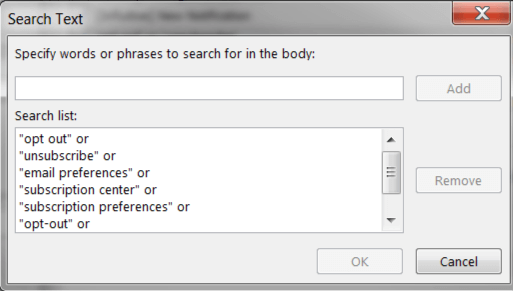
Note: Any email you receive that contains any of these words entered in your rule will automatically be moved into the separate folder once you activate it, so be sure to consider this carefully and remove any words from my list if you don’t want emails containing them to be affected.
- After you’ve added your list of words, select the specified folder you created for where you want your spammy automated marketing emails to be sent. Then click next
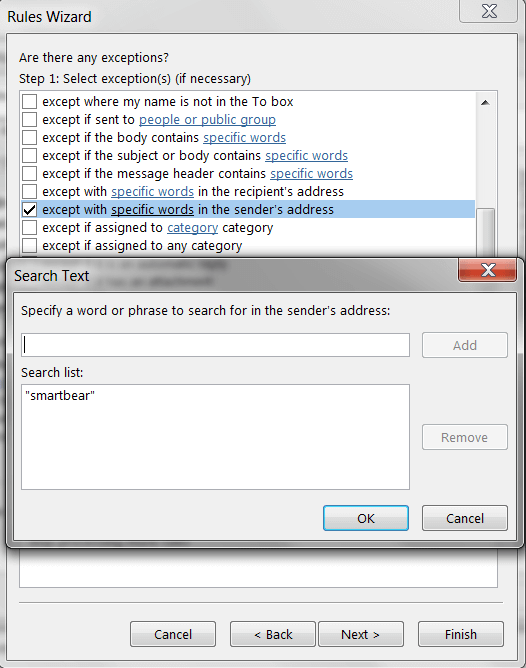
- Add in any exceptions to the rule if you don’t want the rule to apply to specific emails or emails from certain people, such as your own company, which is the exception that I use. To do this, check the box for “except with specific words in the sender’s address” and add in the name of your company as it appears in your corporate email address.
- Create a name for your rule
- Check the box next to “turn on this rule.” If you wish to apply this rule for existing emails in your inbox, check the box for “run this rule now on messages already in Inbox“
- Click “finish” then “apply” then “OK”
Voila! That’s all she wrote. Welcome to the wonderful world of SPAM-free inboxes! If you are like me and receive a ton of automated marketing emails daily, you should immediately notice a blissful difference. Enjoy your productivity.
I would advise that for the first few weeks after you turn on your rule, it is a good idea to closely monitor the emails that are being re-directed to your new spam folder to make sure no emails you would prefer in your inbox are being moved, so that moving forward you can rest easy knowing you aren’t at risk of missing any important emails.
Also, as I mentioned earlier, you may need to periodically add more unsubscribe message phrases to your rule list over time if you notice any emails start sneaking through. As you do, be sure to let me know so I can add them to the master list on this post!
For the Record, I do still read through the marketing emails in my SPAM folder.
As a marketer, looking at others marketers’ emails, content, websites and ads is like a professional musician listening to music from other artists – it’s a source of inspiration.
It’s a little ironic, but ever since I started using this hack, I actually started filling out way many more subscription forms than I ever did previously. I have nothing to lose. It’s a win-win situation for me.
Just about once every other week or so (on my own terms), I will spend some time scanning through my “automated email graveyard” folder hunting for gems drizzled among the rubbish, in search of content and ideas.
If your email marketing and content is good enough, and consistently high quality, you’ll be in the back of my mind to keep an eye out for next time I am sorting through my trash. And if it’s REALLY good, maybe I’ll even add your company to my exceptions rule so your emails are permanently back in my primary inbox so I don’t miss any…
Do you have any other good tips or tricks for stopping unwanted spam emails, or keeping your inbox organized? Any unsubscribe phrases I should add to my list?


Contrary to the usual advice, I tried clicking on all the unsubscribe links in spam. After a couple of months my spam load dropped from 150/day to 15/day. And it is only 15/day because it looks like I pissed off one spammer who now sends 10/day with From’s of .stream and .top and one other domain that I’ve forgotten. The other 5/day are Chinese spam with no unsubscribe links or keywords that I have been able to identify.
Hey Bill – yup, I’ve taken the time to click through the unsubscribe links before as well, and it does work usually. Time was the issue for me – by the time I went through unsubscribing from all of the companies sending me email, it wouldn’t be long until I somehow started hearing from new companies. And the number of senders kept piling. It would be too time-consuming for me to keep with over time, which is what lead me to the hack.
Sorry to hear about your other pain in the butt spammers!
Thanks for sharing, Bill!
казино х россия
[url=https://online-kazino-x.space/zerkalo]казино x зеркало на сегодня[/url]
[url=https://4ip.su]гидра сайт моментальных[/url] – гидра шоп, hydra обход
Wow! This Robot is a great start for an online career.
Link – – https://tinyurl.com/y7t5j7yc
Financial independence is what this robot guarantees.
Link – https://tinyurl.com/y7t5j7yc
2020 interior design software india pvt ltd [url=http://buyautocad.design/#software]autocad price[/url] free office software key. origin 2020 software download [url=http://www.alcohol-injection.com/forum/showthread.php?t=991021&p=2563088#post2563088]2020 design software graphics card[/url] 31f0_ca office suite software (version 2.0), free meeting software 2020. yard office software, software events 2020 buy autocad 2020 software oppo a9 2020 software update download. office software programs free free office software reddit, office software knowledge.
Доброго времени суток!
Сделал заказ брони на сайте Avia-Travel.top, был приятно удивлен выгодными ценами и отличным сервисом.
Не нужно забывать, что на рынке полно недобросовестных туроператоров и всевозможных посредников, поэтому нужен тщательный отбор надежного сервиса и сайта.
Жалко будет, если вас обманут, и вы потеряете свои деньги, убытки будут просто колоссальными, да и нервы расшатаете.
Смотрите на сайт, вам должно быть приятно и удобно пользоваться им, все должно быть понятно и просто.
Должна быть информация со смежными и полезными темами, одним словом сайт https://avia-travel.top/ относится к требованиям полезного и надежного интернет ресурса.
Можете смело и свободно им пользоваться, вы найдете то, что ищите.
Поэтому если вас реально интересует:
[url=https://avia-travel.top/poisk-deshevyh-aviabiletov/]продажа авиабилетов онлайн дешево[/url]
Тогда можете прямо сейчас переходить на сайт и искать нужную информацию.
Реально огромный поиск и сравнение лучших цен на отели и гостиницы. Более 358000 отелей доступных для бронирования, 109000 хостелов, 594000 гостевых домов и 3894000 апартаментов по лучшим ценам!
Увидимся!
We stumbled over here coming from a different website and thought I might as well check things out. I like what I see so now i’m following you. Look forward to going over your web page for a second time. Greetings from Decaar Türkiye https://decaar.com.tr
One click of the robot can bring you thousands of bucks.
Link – https://tinyurl.com/y7t5j7yc
My spouse and I stumbled over here from a different web address and thought I should check things out.
I like what I see so i am just following you. Look forward to exploring your
web page for a second time.
[url=https://www.facebook.com/Reduslim-101958461562598/ ]reduslim[/url]
Если вам нужно заказать винтовой конвейер в Самаре, то советую воспользоваться услугами компании «Проект плюс». Их сайт находится по адресу всеконвейеры.рф. Работают по всей России. Цены демократичные, сроки изготовления очень быстрые, качество хорошее.
[url=https://самара.всеконвейеры.рф/]Купить винтовой конвейер в Самаре[/url] можно заказав на сайте всеконвейеры.рф
Just one click can turn you dollar into $1000.
Link – – https://tinyurl.com/y7t5j7yc
Paramount Webshop in place of Iphone, Samsung and Xuaw
ei Case
https://www.sms.hr
Need money? Get it here easily?
Link – https://tinyurl.com/y7t5j7yc
Guys just made a web-site for me, look at the link:
https://www.google.com/url?sa=t&url=http%3A%2F%2Facvilon-mebel.ru/raznoobrazie-chajnyh-servizov Tell me your prescriptions. Thank you.
Guys just made a web-site for me, look at the link:
https://www.google.com/url?sa=t&url=http%3A%2F%2Flpgbeauty.ru/kak-vybrat-luchshuyu-vizitniczu-iz-serebra/ Tell me your prescriptions. Thank you.
vavada РІРёРї
[url=https://vavada-casino-online.fun/games]вавада официальный сайт играть[/url]
It is the best time to launch the Robot to get more money.
Link – https://tinyurl.com/y7t5j7yc
плей фараон казино
[url=https://faraon-casino.casa/games]карты казино фараон[/url]
казино сол отзывы реальных людей
[url=https://sol-casino.host/reviews]казино sol casino отзывы[/url]
vulkanslots net
[url=https://vulkan-slots.ru/]вулкан слотс россия[/url]
вулкан слотс доступ
[url=https://vulkan-slots.site/]вулкан клуб слотс россия[/url]
Every your dollar can turn into $100 after you lunch this Robot.
Link – https://tinyurl.com/y7t5j7yc
Guys just made a website for me, look at the link:
http://bestideya.mystrikingly.com/ Tell me your recommendations. THX!
Guys just made a web-page for me, look at the link:
http://bisnesplan.g3g.ru/viewtopic.php?id=2#p2 Tell me your guidances. Thank you.
гранд казино отзывы о выплатах
https://grand-kazino-online.host/bonus [url=]гранд казино казино забрать бонус[/url]
Fast & Furious: Dom’s 1973 Chevy Camaro F-Bomb 1/32 Scale
[url=https://pegasbaby.com/infantino-carry-on-multi-pocket-carrier-black-55715]Infantino Carry On Multi-pocket Carrier, Black[/url]
http://svr-technology.ru
Perfect work you have done, this internet site is really cool with excellent information.
Money, money! Make more money with financial robot!
Link – – https://tinyurl.com/y7t5j7yc
[url=https://casino24list.com/][/url]
Guys just made a web-site for me, look at the link:
http://bestslotsonline.iwopop.com/ Tell me your references. Thank you.
what is viagra pill is viagra legal home make viagra for men
Вам перевод 113022 р. https://tinyurl.com/gokthoca NMVVcustomerjourneymarketer.comRKKF
Dịch vụ bán Nick FB có avata DV bán account facebook trắng , đặc điểm nick fb trắng là chưa có thân quen , avata or tương tác. Truy cập : http://taikhoan.co
Hot Wheels 2019 Batman 1:64 Scaled 5-Pack
[url=https://pegasbaby.com/baby-shusher-the-sleep-miracle-soother-97858]Baby Shusher – The Sleep Miracle Soother[/url]
I’m not sure where you’re getting your info, but good topic.
I needs to spend some time learning more or understanding
more. Thanks for fantastic information I was looking for this info for my
mission.
безукоризненный сайт
[url=https://pizdeishn.net/izmena/171-rayskiy-bar.html]https://pizdeishn.net/izmena/171-rayskiy-bar.html[/url]
Hi! [url=http://lolasix.info/]how to order lasix[/url] where can i buy diuretic lasix
her comment is here [url=https://empirestuff.org/]empire market link[/url]
[url=https://mukis.ru]промокод яндекс директ 2020[/url] – купить купон на яндекс директ, купить купон на яндекс директ
[url=https://kursy-ege.ru/biology/66-ege-biology.html]биология егэ подготовка с нуля[/url] – репетитор по физике, физика курсы
helpful resources [url=https://hydraruzxpwnew4afonion.com/]гидра[/url]
[url=https://stop-nark.ru/narko/17-zavisimost-ot-soley.html]лечение солевой зависимости[/url] – вывод человека из запоя, пивной алкоголизм у мужчин лечение
dig this [url=https://empire-market.xyz/]empire market onion[/url]
Magzhan Kenesbai energy markets
[url=https://uic.org/com/enews/578/article/kazakhstan-modern-warehouses-will-be-built-on-the-territory-of-the-special?page=iframe_enews]Magzhan Kenesbai investments into Private Equity[/url]
Additional income is now available for anyone all around the world.
Link – https://tinyurl.com/y7t5j7yc
I <3 ur huge buns!
Hello! [url=http://loprozac.info/]paxil cr 12 5 mg[/url] Paxil us paxil mg
игра казино икс
[url=https://online-kazino-x.space/registration]регистрация casino x[/url]
вулкан slots игровые
[url=https://vulkan-slots.ru/]вулкан slots[/url]
игровой автомат фараон
[url=https://faraon-casino.casa/games]казино фараон онлайн играть бесплатно автоматы[/url]
More Help [url=https://empirestuff.org/]darknet[/url]
DZT1968 Multi shape Soft Toy Animal Baby Infant Kids Hand Wrist Bells Foot Sock Rattles
[url=https://pegasbaby.com/on-the-goldbug-car-seat-strap-cover-panda-58776]On the Goldbug Car Seat Strap Cover, Panda[/url]
мировой вебсайт
[url=https://pizdeishn.net/]Горячие секс истории про тещу[/url]
vulkan slots доступ
[url=https://vulkan-slots.ru/signup]вулкан slots регистрация[/url]
вулкан slots зеркало
[url=https://vulkan-slots.site/]вулкан slots официальный сайт[/url]
гранд казино отзывы
https://grand-kazino-online.host/ [url=]гранд casino[/url]
зарегистрироваться вавада
[url=https://vavada-casino-online.fun/]вавада казино[/url]
рабочее зеркало казино фараон
[url=https://faraon-casino.casa/]казино фараон[/url]
казино онлайн фараон бесплатно без регистрации
[url=https://faraon-casino.casa/reviews]интернет казино фараон отзывы[/url]
[url=https://www.facebook.com/Perdere-10-kg-in-una-settimana-104789051277818/]perdere 10 kg in una settimana[/url]